Building Bonxai and NavMap Maps from a Recorded ROSBag
This HowTo shows how to generate both Bonxai and NavMap representations
from a recorded ROSBag containing a PointCloud2 map, typically produced
by a SLAM algorithm. The input point cloud must be referenced to the world
or map frame.
—
Setup
Install EasyNav (see Build & Install) with the two plugins this tutorial uses, the Bonxai Maps Manager and the NavMap Maps Manager:
sudo apt install ros-<distro>-easynav ros-<distro>-easynav-bonxai-maps-manager \
  ros-<distro>-easynav-navmap-maps-manager
You also need a recorded ROS bag containing a PointCloud2 map, e.g. recorded while running a
3D lidar SLAM. The commands below use a bag of the URJC excavation; use your own.
—
Overview
You will:
Align coordinate frames (
world→mapif needed).Play a pre-recorded ROS bag containing the
/mappoint cloud.Launch EasyNav with both BonxaiMapsManager and NavMapMapsManager to build the two maps simultaneously.
Visualize both in RViz2.
Save the resulting maps to disk.
—
1. Align the Frames (world → map)
If your ROS bag publishes a PointCloud2 in the frame world,
you need to publish a static transform so that the map managers
receive data in map.
In a new terminal, run:
ros2 run tf2_ros static_transform_publisher --frame-id world --child-frame-id map
Keep this terminal running for the entire session.
If your point cloud is already in the map frame, skip this step.
—
2. Play the ROSBag
Next, replay the recorded ROS bag containing the point cloud map.
The example bag is about 1600 seconds long. To jump close to the end (around 1500 seconds, when the map is already dense) but still leave a few seconds to build the maps, run:
ros2 bag play rosbag_excavation_urjc_map_tf_only --clock --start-offset 1500
This will replay the point cloud topic /map and the TF tree
needed by the map managers.
—
5. Visualize in RViz2
Open RViz2 to monitor both map managers.
ros2 run rviz2 rviz2 --ros-args -p use_sim_time:=true
In RViz:
Add a PointCloud2 display for Bonxai maps. - Select the topic published by BonxaiMapsManager (e.g.,
/maps_manager_node/bonxai/map). - QoS: Transient Local. - You can visualize the cloud as boxes with configurable size for clearer 3D structure.Add a NavMapDisplay (custom display type). - Select the topic published by NavMapMapsManager (e.g.,
/maps_manager_node/navmap/map). - QoS: Transient Local.
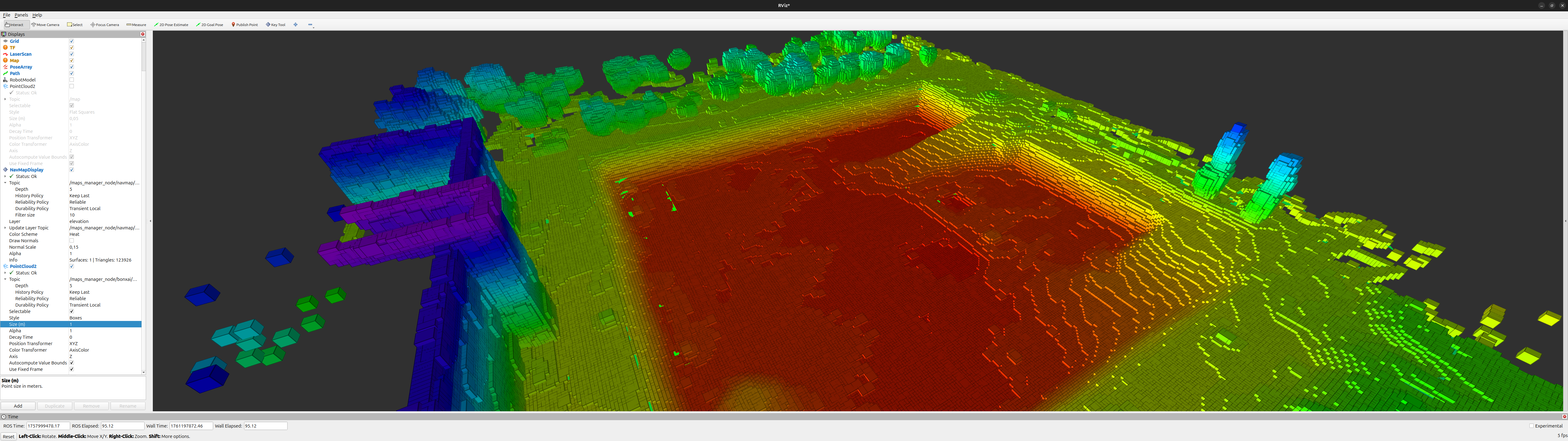
Figure 6 Bonxai map visualization in RViz.
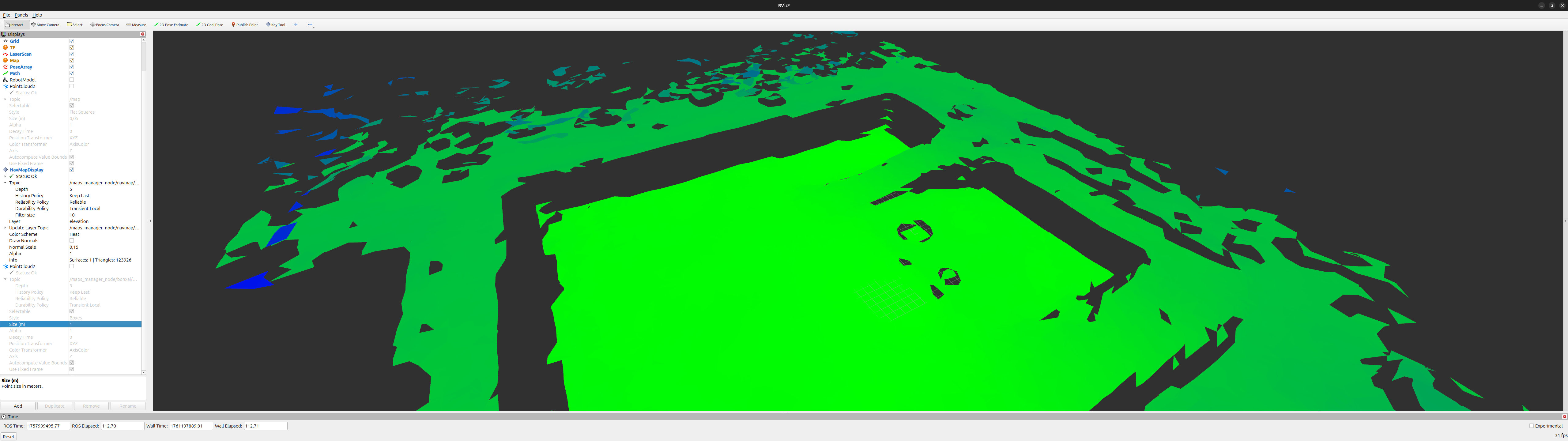
Figure 7 NavMap mesh visualization in RViz.
—
6. Save the Maps
When both maps are visible and complete, you can store them to disk using their respective map manager services.
Save NavMap
ros2 service call /maps_manager_node/navmap/savemap std_srvs/srv/Trigger
The NavMapMapsManager always writes to the hardcoded path /tmp/map.navmap
(this is unconditional in the current implementation, regardless of any navmap_path_file
you configured). Rename and move it to your desired location (e.g. inside maps/).
Save Bonxai Map
ros2 service call /maps_manager_node/bonxai/savemap std_srvs/srv/Trigger
Unlike the NavMap manager, BonxaiMapsManager saves back to the path it loaded the map from
(package/bonxai_path_file): with no map file configured, as here, to
/tmp/bonxai_map.pcd. Move both files into the maps/ directory of a package, and load them
with package and bonxai_path_file / navmap_path_file (see Navigating with the NavMap + Bonxai Stack).
—
7. Summary
You have:
✅ Aligned frames between
worldandmap✅ Played a recorded ROS bag with point cloud data
✅ Built Bonxai and NavMap maps simultaneously
✅ Visualized them in RViz
✅ Saved both maps to disk for future use
These maps can now be used in a NavMap + Bonxai navigation stack (see Navigating with the NavMap + Bonxai Stack).
—
Next steps: